How to Run 20+ Agents Comfortably (July 2026)
My practical, temporary setup for running 20+ coding agents across cheap always-on servers: Tailscale, closed ports, tmux, Cloudflare tunnels, backups and monitoring.
In 6 to 12 months I will probably laugh about this setup. Some open source tool, a new technique, or a smarter agent will do all of it for you. Read this as temporal.
It is heavily inspired by @levelsio’s tweets. Most of the credit is his, this is just my practical take.
The goal: keep 20+ agents working in parallel, reachable from anywhere including my phone, without babysitting them. Below are the building blocks. The hard technical details you can solve with your own agent.
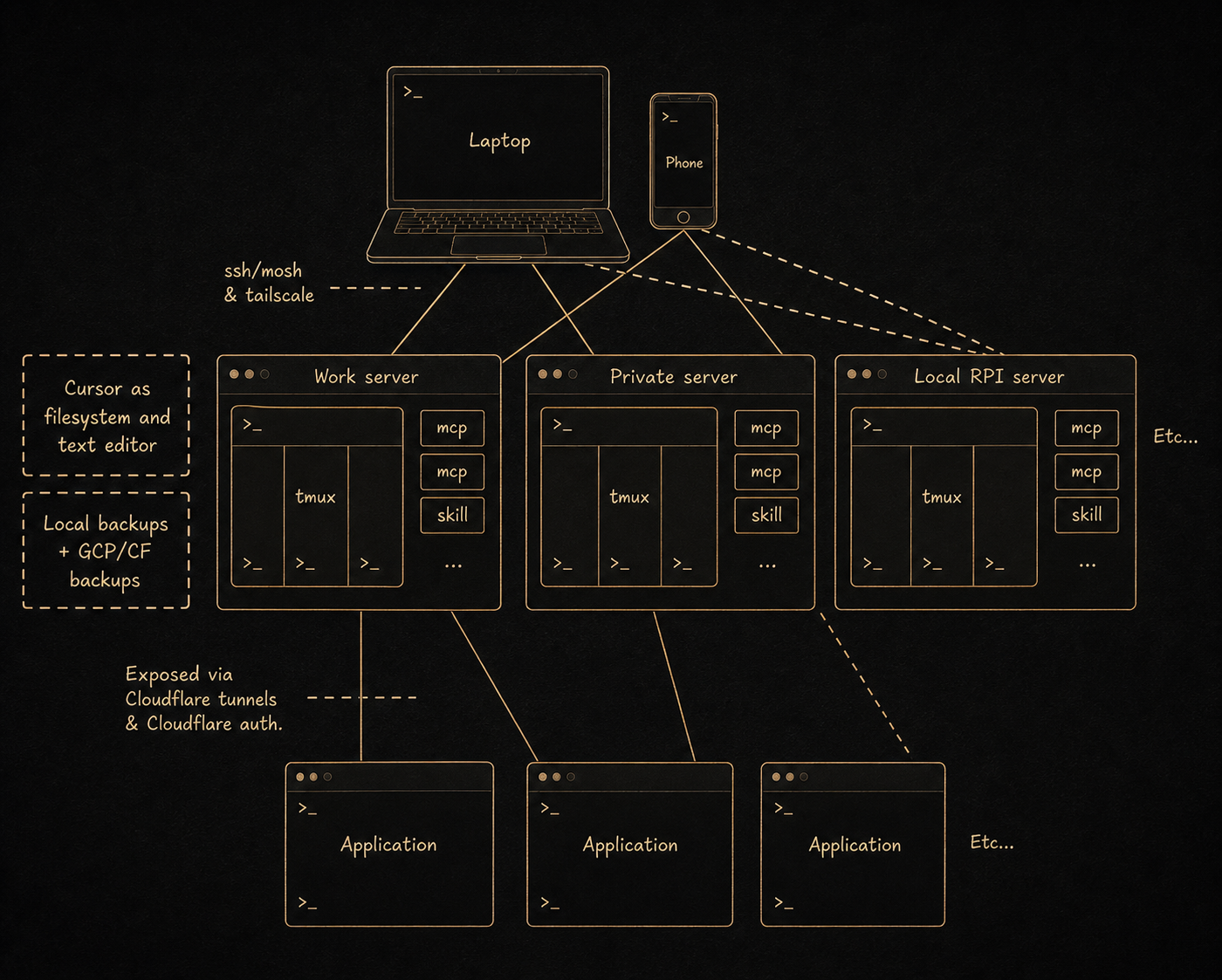
The shape. A few cheap always-on servers, split by trust: one for work, one private. In my case Hetzner Ubuntu boxes, 4GB of RAM is doable, 8GB is more comfortable. OVH Cloud is a fine alternative. Agents run on the servers, not on my laptop. The laptop and phone are just windows into them, so nothing dies when I close the lid or lose signal.
Access, from anywhere
- Tailscale. One private mesh over every machine: servers, laptop, phone. They reach each other by name. This is the backbone.
- All ports closed. Firewall everything shut and reach the machines only over Tailscale. Nothing SSH-facing on the public internet.
- ssh + mosh. mosh survives flaky wifi, network switching and sleep. Paired with tmux you reconnect and nothing was lost. This is what makes driving agents from a phone actually work.
- Hetzner recovery console. You will lock yourself out at some point, a bad firewall rule or Tailscale down. The provider’s out-of-band console is your way back in. Find it before you need it.
Running the agents
- cmux on the Mac, tmux on the servers. cmux to fan out and glance across many agents at once. tmux windows per project on each server, so every session stays alive server-side.
- Auto mode on, remote connections always on. Agents keep going without me clicking approve, and I can reach them from any device.
- MCP and skills per project. Each project ships the tools and skills its agents need, so an agent lands ready to work.
- pm2. Keeps the apps and long-running processes up across disconnects and reboots.
- An editor as a filesystem. I keep Cursor open on the servers over the network, mostly to browse and read what the agents actually did.
Actually operating them
The trick is not the tooling, it is how you move through it. I keep about three agents live per server, each in its own tmux window, and I walk the machines in a fixed loop. Page one is the laptop, page two my private server, page three the work box, and so on.
Every stop is the same move. Read what the agent just finished, check it, then hand back zero to three follow-up prompts depending on what it needs. The moment it starts working again I leave and go to the next page. By the time I come back around, it has usually produced something new to check.
So there is no single task I am focused on. It is a continuous loop of check and next instruction across all of them. Switching context this hard is not for everyone, but it is the honest answer to how you actually run 20 agents at once instead of babysitting one.
Exposing the work
- Cloudflare tunnels for exposed domains. Public apps dial out through a tunnel, so there are no open inbound ports.
- Cloudflare Access for protected domains. An auth wall in front of anything private but remote, so a half-built internal tool is never on the open web.
Safety net
Agents move fast and delete things, so the backups have to be automatic, encrypted, and actually tested, not aspirational. Three tiers, each catching what the one above misses:
- Hetzner full-server backup. A daily image of the whole box under everything, the coarse net for when a server dies entirely.
- Litestream. Streams the live databases off the box continuously, so the newest writes are never only in one place.
- restic to Cloudflare R2. A nightly job on every server to its own R2 bucket: encrypted, versioned, deduplicated, with old snapshots pruned on a schedule. Each host gets its own repo and its own scoped token, so one leaked key cannot touch another box.
On top of the tiers:
- The database trick. Before each run I stage every live SQLite database with a proper
.backup, so restic captures a consistent image instead of a half-written file. If nothing gets staged, the job fails loud instead of quietly backing up nothing. - Verified, not assumed. I test-restored every repo end to end: pull a database back down from R2, run an integrity check, compare it to the live one. This is the layer most people skip, and it is the only one that tells you the backups actually work.
- Monitoring and push alerts. Uptime Kuma watches the services and the nightly backups, ntfy pings my phone the moment one falls over. With 20+ agents you will not notice a dead app, or a silently failing backup, by staring at it.
That is the whole thing. Cheap servers, one private network, closed by default, deliberate holes where needed, and a way back in when you lock yourself out.
The drawing at the top stops at “Etc…”. Here is the same shape with the etcetera filled in: 20 agents across four servers, a Raspberry Pi and the laptop. The names are indicative, yours will be different.
flowchart LR

  PHONE["Phone<br/>ssh + mosh, reattach tmux"]
  TS{{"Tailscale mesh<br/>every machine by name<br/>all public ports closed"}}
  PHONE ==> TS

  subgraph LAP["Laptop: cmux + editor as filesystem"]
    CMUX["cmux<br/>glance across all 20"]
    A19["19. drafts"]
    A20["20. scratch"]
    CMUX --> A19 & A20
  end
  TS ==> CMUX

  subgraph S1["Server 1: Work, 8GB"]
    T1["tmux<br/>5 windows"]
    A1["1. api-service"]
    A2["2. web-app"]
    A3["3. report-builder"]
    A4["4. site-crawler"]
    A5["5. inbox-triage"]
    T1 --> A1 & A2 & A3 & A4 & A5
  end

  subgraph S2["Server 2: Private, 8GB"]
    T2["tmux<br/>5 windows"]
    A6["6. data-pipeline"]
    A7["7. knowledge-base"]
    A8["8. metrics-tracker"]
    A9["9. graph-builder"]
    A10["10. note-sync"]
    T2 --> A6 & A7 & A8 & A9 & A10
  end

  subgraph S3["Server 3: Lab, 4GB"]
    T3["tmux<br/>3 windows"]
    A11["11. spike"]
    A12["12. refactor-bot"]
    A13["13. scraper"]
    T3 --> A11 & A12 & A13
  end

  subgraph S4["Server 4: Jobs, 4GB"]
    T4["tmux<br/>3 windows"]
    A14["14. media-encode"]
    A15["15. tts-render"]
    A16["16. backup-verify"]
    T4 --> A14 & A15 & A16
  end

  subgraph RPI["Raspberry Pi: home LAN, always on"]
    T5["tmux<br/>2 windows"]
    A17["17. home-dashboard"]
    A18["18. lan-watchdog"]
    T5 --> A17 & A18
  end

  TS ==> T1 & T2 & T3 & T4 & T5

  CF["Cloudflare tunnel<br/>dials out, no inbound ports<br/>public domains + Access wall"]
  A2 --> CF
  A7 --> CF
  A17 -. "never exposed" .-> LANONLY["Home LAN only"]

  BK["Backups, layered:<br/>Hetzner snapshot, Litestream,<br/>restic to R2, encrypted + verified"]
  MON["Uptime Kuma + ntfy<br/>pings my phone"]
  A5 --> BK
  A10 --> BK
  A16 --> BK
  A2 --> MON
  A7 --> MON